remotion-voiceover is an open-source Node.js command-line tool that turns a narration script into an AI voiceover for Remotion and HyperFrames videos. One command writes one WAV per line, a frame-timed voiceover.json, word-level @remotion/captions JSON, SRT and VTT subtitles, and a HyperFrames audio_request.json, with voice cloning and several voices per video. Code on GitHub (MIT).

captions.json (@remotion/captions) · voiceover.json · SRT · VTT
Transcript
hook, Ben (cloned male voice, frames 0–171): Your Remotion video finally has a real voice, and every caption is timed to the word.
cta, Ava (cloned female voice, frames 189–338): Write the script once, run one command, and render with perfectly synced voiceover.
export MIRAGEA_API_KEY=...        # https://miragea.ai/workspace/api
npx github:RTY2345RR/remotion-voiceover generate voiceover.md --hyperframes
npx remotion render src/index.ts Voiceover out/video.mp4
Using an AI agent? Install https://miragea.ai/skills/miragea-audio/install.md
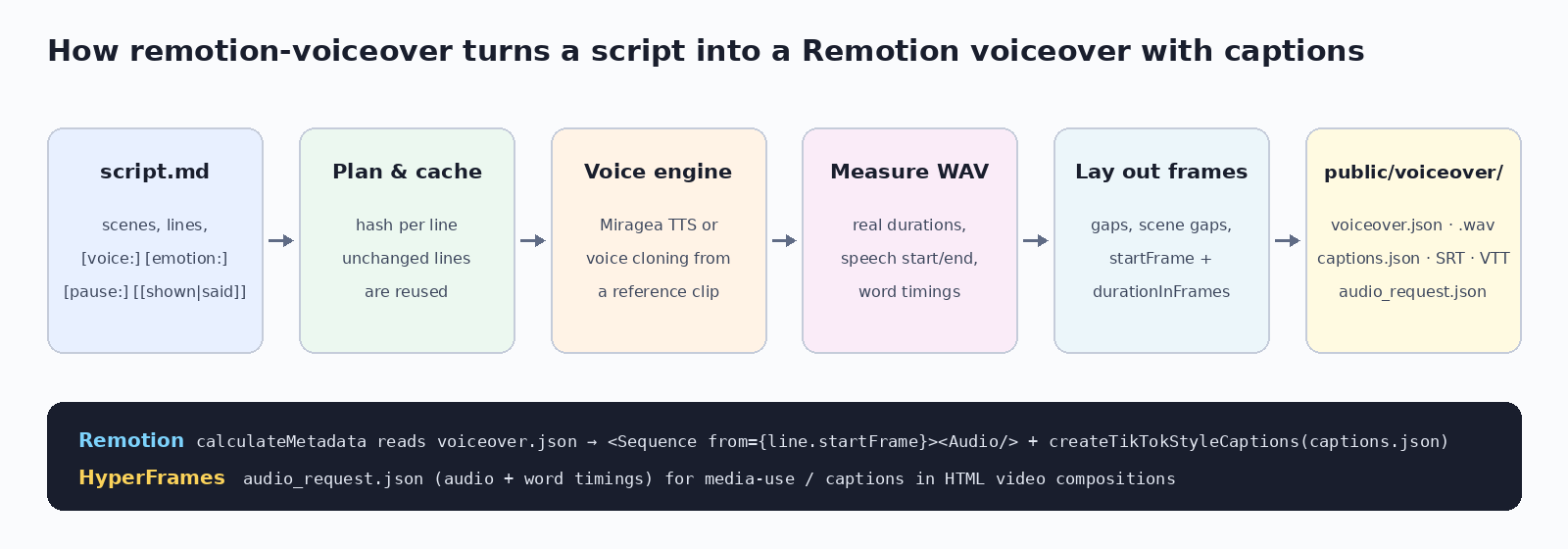
voiceover.json (startFrame, durationInFrames per scene and line) for calculateMetadata.captions.json for createTikTokStyleCaptions(), plus SRT and VTT.[voice: name]; [emotion:], [speed:], [pause:].audio_request.json with --hyperframes.| remotion-voiceover | template-tiktok | remotion-superpowers | HyperFrames media-use | |
|---|---|---|---|---|
| Generates voiceover | Yes | No (captions only) | Yes (ElevenLabs) | Yes (HeyGen or Kokoro) |
| Voice cloning | Yes | No | Not documented | Paid HeyGen plan |
| Frame timings JSON | Yes | No | Not documented | No |
| @remotion/captions JSON | Yes | Yes (Whisper.cpp) | Yes (Whisper) | No |
| Licence | MIT | Remotion licence | MIT | Apache-2.0 |
Other projects: facts from their public READMEs, November 2026. "Not documented" means we could not find it.
Generate the audio into public/, then play it with an Audio element inside a Sequence. remotion-voiceover generates the audio and writes each line's start frame in voiceover.json.
No. Remotion renders video from React and audio comes from files. remotion-voiceover is the Remotion TTS step that makes those files plus timings and captions.
Use @remotion/captions: pass the Caption[] JSON this tool writes to createTikTokStyleCaptions(). SRT and VTT are written too.
Yes. remotion-voiceover uses the Miragea voice engine for text to speech and voice cloning and writes the files a Remotion project needs.
Yes. Put a public WAV/MP3 clip URL and its exact words under voices: in the front matter and use [voice: name].
Yes. Define several voices and switch with [voice: ...] on a scene heading or a line.
Yes. Add --hyperframes to write audio_request.json with audio paths and word timings.
Only that line is voiced again; the rest are reused and timings are recomputed.
Voices by the Miragea voice engine (https://miragea.ai/v1). Demo reference voices: CMU ARCTIC (bdl, slt), © Carnegie Mellon University.